Mastering Deep Learning Model Deployment for Computer Vision on Azure Machine Learning
Mastering Deep Learning Model Deployment for Computer Vision on Azure Machine Learning

Meta Description: Learn how to deploy a deep learning model for computer vision on Azure Machine Learning. This step-by-step guide covers everything from architecture to advanced troubleshooting for IT professionals.
Introduction – Strategic Context & Business Value
In today's digital era, computer vision has become a pivotal technology for a wide range of applications such as facial recognition, object detection, and medical image analysis. Deploying deep learning models for computer vision can be complex, but Azure Machine Learning (AML) provides a robust platform that makes it easier for IT professionals to build, train, and deploy models at scale. This blog post will guide you through the process of deploying a deep learning model for computer vision on Azure Machine Learning, covering everything from the initial architecture setup to advanced troubleshooting and best practices.
Technical Architecture Overview
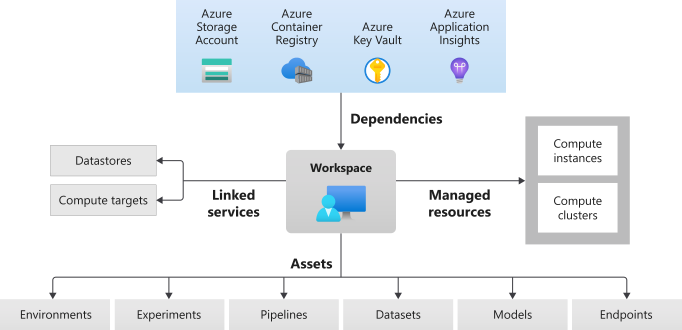
To deploy a deep learning model for computer vision on Azure Machine Learning, a well-defined architecture is crucial. The typical architecture includes the following components:
Data Storage: Azure Blob Storage for storing raw image data.
Data Preprocessing: Azure Databricks or AML pipelines for data cleaning and transformation.
Model Training: AML Compute for training deep learning models such as Convolutional Neural Networks (CNNs).
Model Deployment: AML endpoints for real-time or batch inference.
Monitoring and Logging: Azure Monitor and AML's built-in logging capabilities for tracking model performance and health.
This architecture ensures a scalable, secure, and efficient workflow for deploying deep learning models for computer vision tasks.
Configuration Walkthrough
Step 1: Setting Up Azure Machine Learning Workspace
First, you need to create an Azure Machine Learning workspace. This is the top-level resource for AML and provides a centralized place to work with all the artifacts you create when you use AML.
- Log in to the Azure portal.
- Search for "Machine Learning" and select "Machine Learning" from the results.
- Click on "Create" and fill in the required details such as subscription, resource group, workspace name, and region.
- Click "Review + Create" and then "Create" to provision the workspace.
Step 2: Data Storage and Preprocessing
Store your raw image data in Azure Blob Storage. You can then use Azure Databricks or AML pipelines for data preprocessing tasks such as resizing images, normalizing pixel values, and splitting data into training and validation sets.
- Create an Azure Blob Storage account and upload your image dataset.
- Use Azure Databricks to preprocess the data. Alternatively, you can use AML pipelines for a more integrated experience.
Step 3: Model Training
Train your deep learning model using AML Compute. AML supports popular deep learning frameworks such as TensorFlow, PyTorch, and Keras.
- Create a new AML Compute instance or cluster for training.
- Write a training script in your preferred deep learning framework.
- Use AML's Experiment class to submit the training job.
- Monitor the training process through the AML Studio interface.
Step 4: Model Deployment
Once your model is trained, you need to deploy it for inference. AML supports real-time and batch inference endpoints.
- Register your trained model in the AML workspace.
- Create an inference script that defines how to load the model and make predictions.
- Deploy the model to an AML endpoint (either ACI for testing or AKS for production).
- Test the deployed endpoint using sample images.
Step 5: Monitoring and Logging
Use Azure Monitor and AML's built-in logging capabilities to keep track of your model's performance and health.
- Set up Azure Monitor to collect metrics and logs from your AML workspace.
- Use AML's model monitoring features to track data drift and model performance over time.
Troubleshooting & Monitoring
Deploying deep learning models can sometimes be challenging. Here are some common issues and their solutions:
Model Deployment Failures: Check the logs in AML Studio for any error messages. Common issues include incorrect environment configurations or missing dependencies in the inference script.
Performance Bottlenecks: Use Azure Monitor to identify any performance bottlenecks in your AML Compute instances or AKS clusters. You may need to scale up your compute resources.
Data Drift: AML provides tools to monitor data drift. If the input data distribution changes significantly, retrain your model with new data.
Enterprise Best Practices 🚀
Security-First Design: Always ensure that your AML workspace and associated resources are secured using Azure Active Directory (AAD) and role-based access control (RBAC).
Role-Based Access Control (RBAC): Define roles and permissions for different team members to ensure that only authorized personnel can access and modify the AML workspace and models.
Automated Backups and Disaster Recovery: Regularly back up your AML workspace and models. Use Azure Backup and ensure that you have a disaster recovery plan in place.
Continuous Integration and Continuous Deployment (CI/CD): Implement CI/CD pipelines for your machine learning workflows using Azure DevOps or GitHub Actions.
Cost Management: Monitor and manage your AML costs by setting up budget alerts and using cost management tools in Azure.
Conclusion
Deploying a deep learning model for computer vision on Azure Machine Learning can be a complex but rewarding process. By following the steps outlined in this guide, you can set up a robust and scalable architecture, train and deploy your model, and ensure that it is monitored and maintained effectively. Adopting best practices such as security-first design, RBAC, and automated backups will help you manage your machine learning workflows efficiently. As a Senior Cloud Architect, mastering these steps will enable you to deliver high-impact AI solutions that drive business value.
By leveraging Azure Machine Learning, you can make the most of your deep learning models and bring cutting-edge computer vision applications to life. Happy coding!


Comments
Post a Comment